 Aangan
Guide
Everything Aangan does.
Aangan is meant to be obvious, but here is all of it in one place, from the remote's buttons to what happens on a festival morning.
The home screen
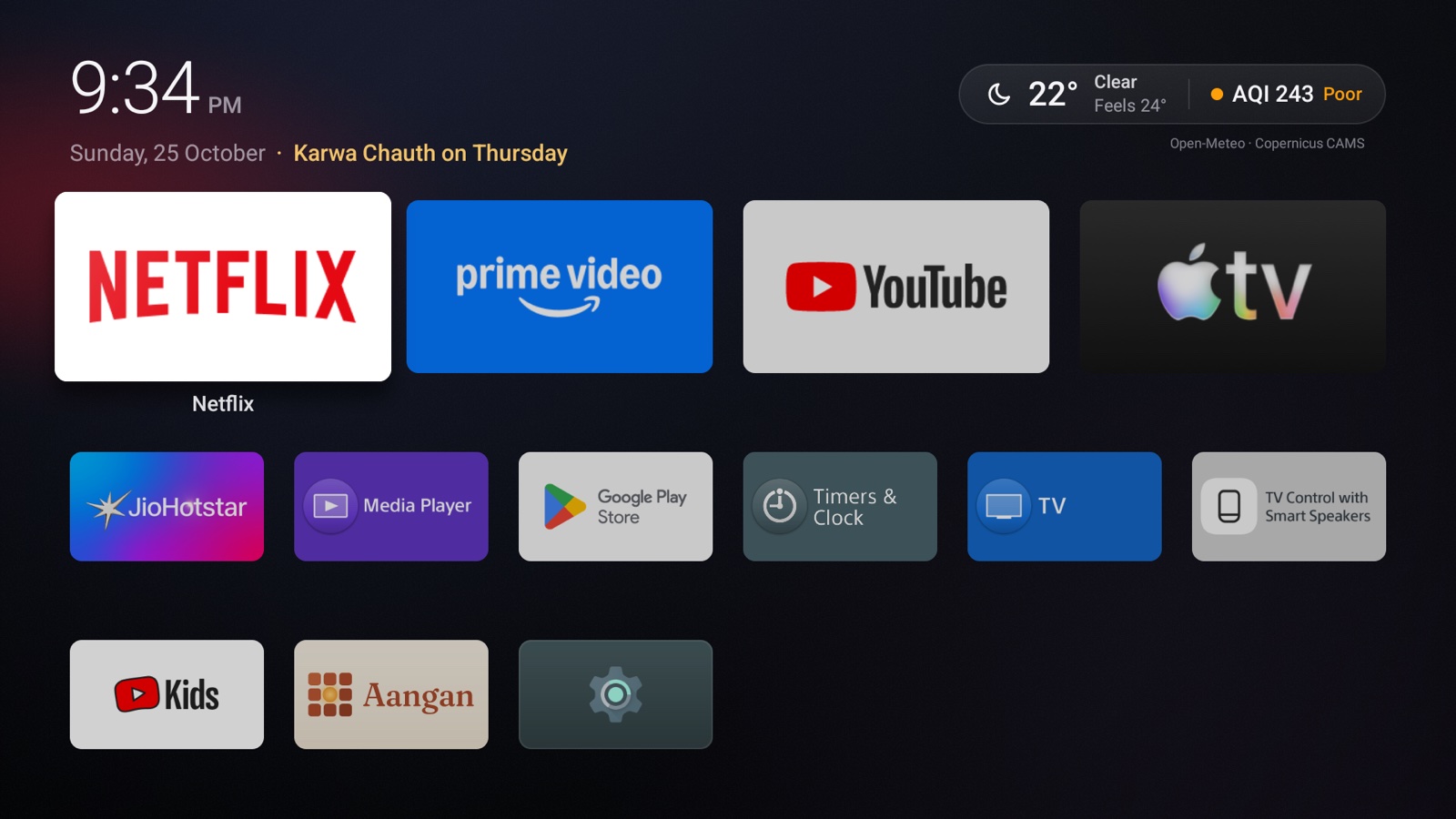
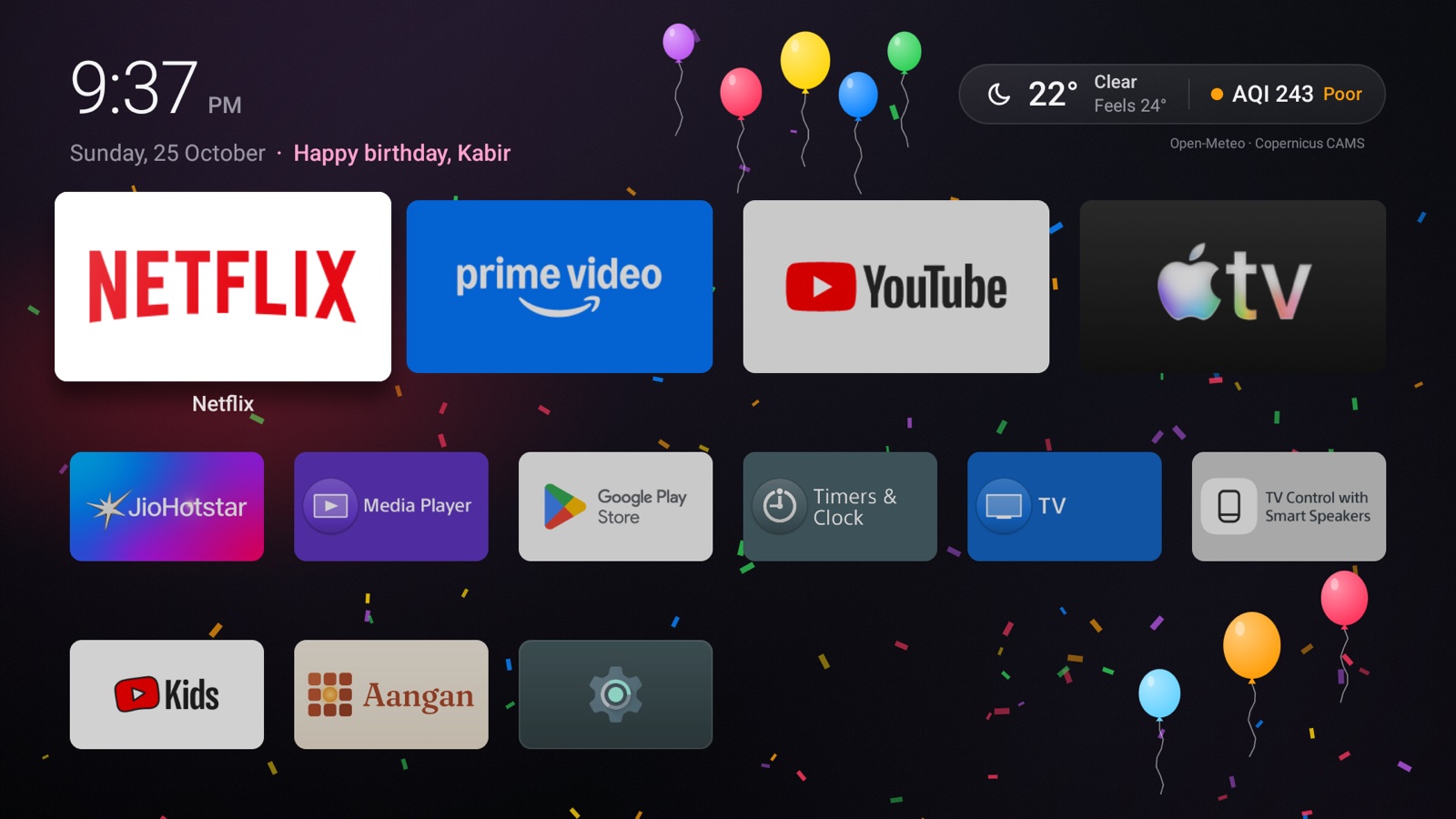
From top to bottom:
- The time and date. Beside the date, the next festival or family day within a month: "Diwali in 14 days", "Holi tomorrow", or the greeting on the day.
- The weather pill. The temperature, conditions, how it feels and the air quality, coloured by how healthy the air is. Below it, a small credit to the data sources.
- The dock. Four apps you choose, larger than the rest, so your favourites are one press away.
- Every other app, in a grid. At the end are Settings (Aangan's own) and, until Aangan opens with the Home button, a Set up Aangan tile.
The first eight times the home screen opens, a line of tips runs along the bottom. After that it stays out of the way.
The dock and your apps
Move around with the arrow keys and press OK to open an app. Hold OK on an app (or press Menu, if your remote has one) for its menu:
| On an app in the dock | On any other app |
|---|---|
| Change app, to choose another app for this place Move left and Move right Remove from the dock, which leaves the place empty App info, which opens Android's page for the app | Put in the dock, then choose which app it replaces Hide, which takes it off the home screen without uninstalling it App info |
The dock stays as you leave it. At first it holds your old top row, if you had one, or popular streaming apps you have installed, such as Netflix, YouTube and Prime Video, then the rest in alphabetical order. Choosing an app that's already in the dock swaps the two places, so nothing drops out. From then on, only you change it: Aangan never reorders it by what you watch, and if you uninstall a dock app, its place stays empty, with a +, until you choose another. You can also set the dock in Settings or from your phone.
To bring back hidden apps, hold OK on the Settings tile and choose Show hidden apps. New apps you install appear in the grid automatically.
Weather and air quality
Aangan shows the weather for one city: Gurgaon until you choose another in Settings. It doesn't use your TV's location, and it has no permission to.
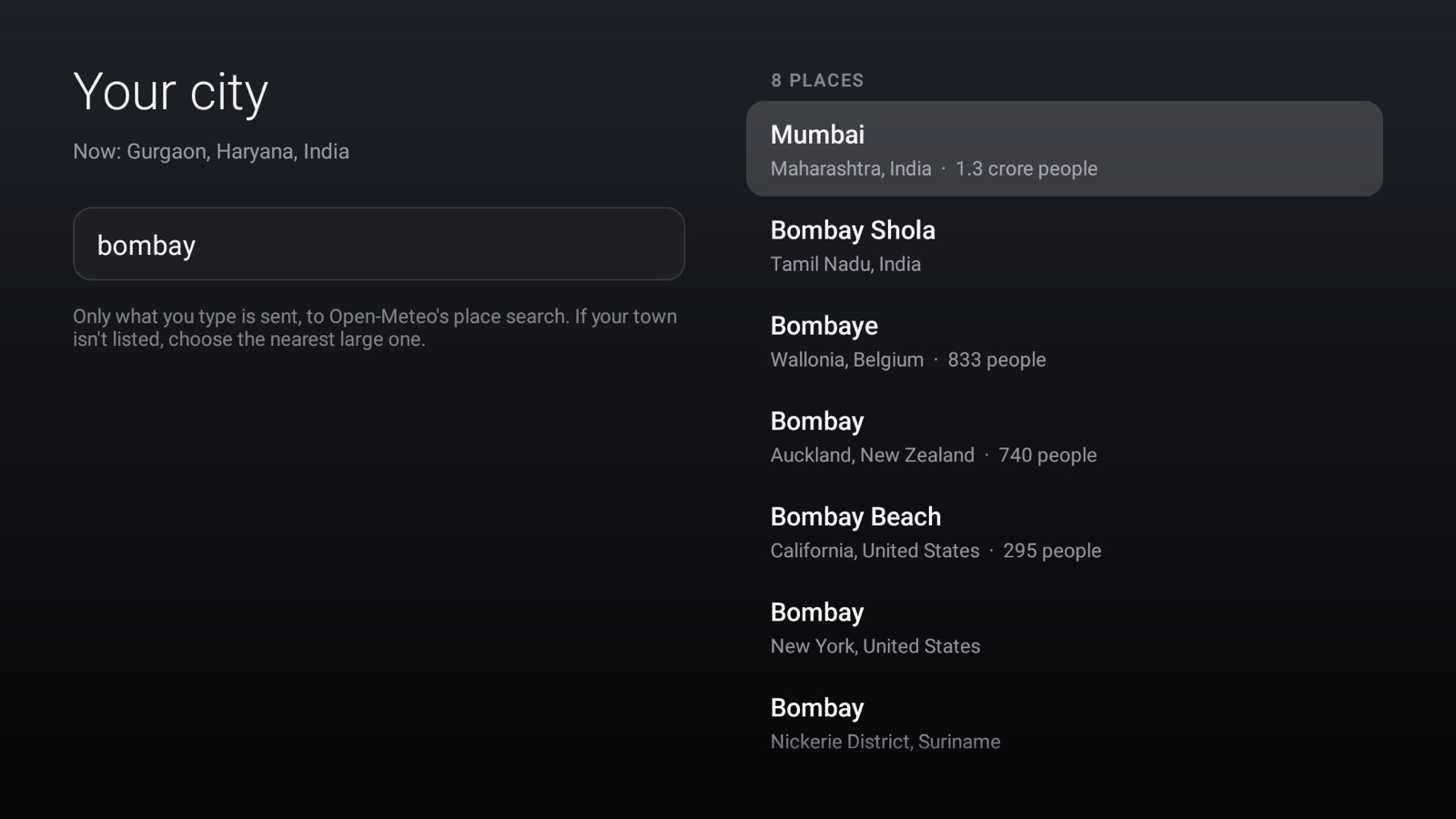
To choose your city, open Settings → City. Large Indian cities are listed straight away, so you may not need to type at all. Otherwise type a few letters: matching towns and cities appear as you type, with their state and size so you can tell places with the same name apart. Older names work too, such as Bombay, Bangalore, Calcutta, Madras and Gurgaon.
- Weather refreshes at most every 30 minutes, air quality at most every hour, and only while the home screen is on screen. While you watch something, Aangan makes no requests.
- In India, air quality uses the CPCB National Air Quality Index (Good, Satisfactory, Moderate, Poor, Very Poor, Severe), from PM2.5 and PM10. Elsewhere it uses the US EPA scale.
- If the TV is offline, the last reading stays. Once it's more than three hours old, the pill fades to show it, and the screensaver leaves the weather out.
The Today card
Press ▲ to reach the weather pill, then OK. Back closes it.
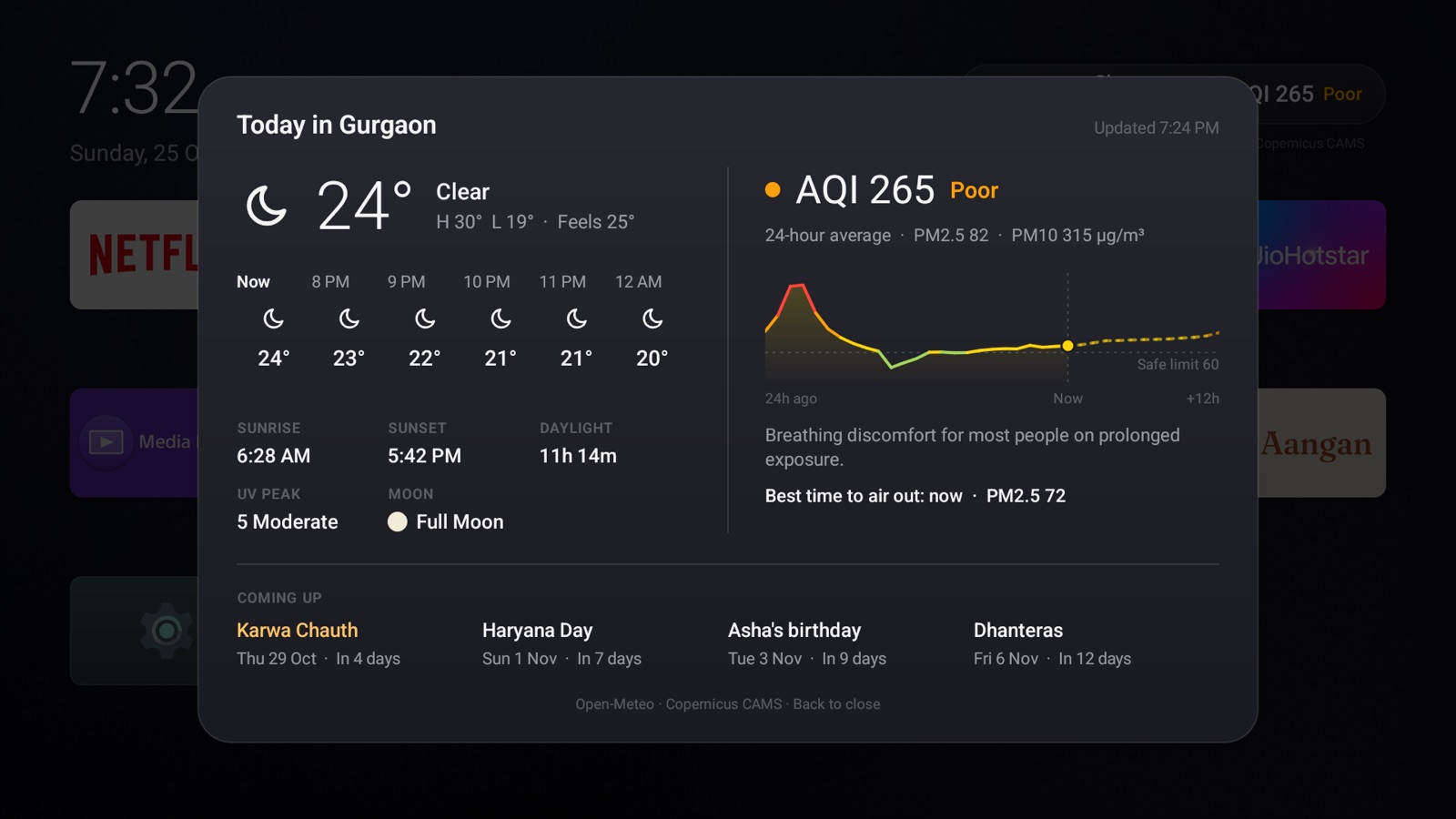
- Weather: the next six hours, the high and low, and a note if rain is likely soon.
- The day: sunrise, sunset, hours of daylight, the UV peak and the moon's phase.
- Air: the 24-hour average, PM2.5 and PM10, what the level means for health, and a 36-hour PM2.5 chart drawn against the country's safe limit.
- Best time to air out the house: the cleanest stretch in the next 18 hours, or a note that there isn't one.
- Coming up: the next four festivals and family days.
Festivals
Aangan carries a calendar of the main Indian festivals and national days, from Lohri to Christmas. See the full calendar.
- Before: the countdown appears beside the date up to 30 days ahead.
- On the day: a hand-drawn scene plays an opening behind your apps, then keeps moving gently while the home screen is showing. The screensaver carries the greeting too.
- Festival weeks: days between two entries with the same scene, up to nine days apart, share it. So all of Diwali week and Navratri glow, not just the main days.
- Dates from the moon: Eid depends on a moon sighting; its date is marked "expected" and may move by a day.
Moving or hiding a festival
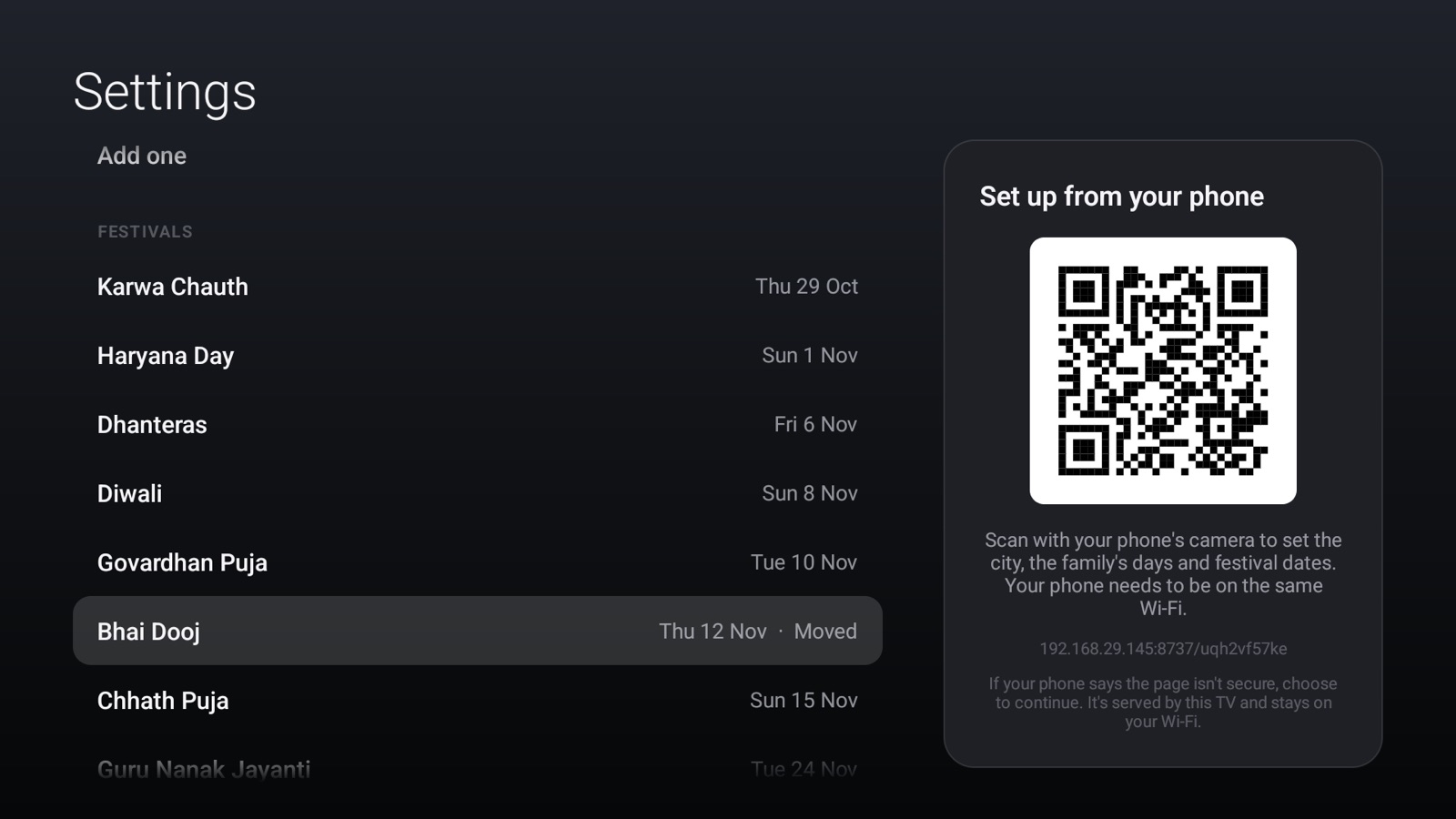
Calendars differ by region and family. If yours keeps a festival on another day, or doesn't celebrate one, change it. Open Settings, scroll to Festivals and press OK on one:
- See how it looks: its scene, now. Back returns to Settings.
- Change the date to any day within a year of the calendar's date.
- Hide it for the year, or Show it again.
- Back to the calendar's date, once you've moved it.
Birthdays and anniversaries
Add the family's days in Settings or from your phone: a name as you'd say it ("Asha", "Dadi", "Asha & Rohan"), birthday or anniversary, and the date. No year is needed or stored.
- They join the countdown and the Today card like festivals.
- On the day, a birthday brings balloons and confetti, and an anniversary two gold rings, hearts and rose petals, with "Happy birthday, Asha" by the clock.
- A birthday on 29 February is celebrated on the 28th in other years.
- If a family day and a festival fall together, the family day comes first.
Settings
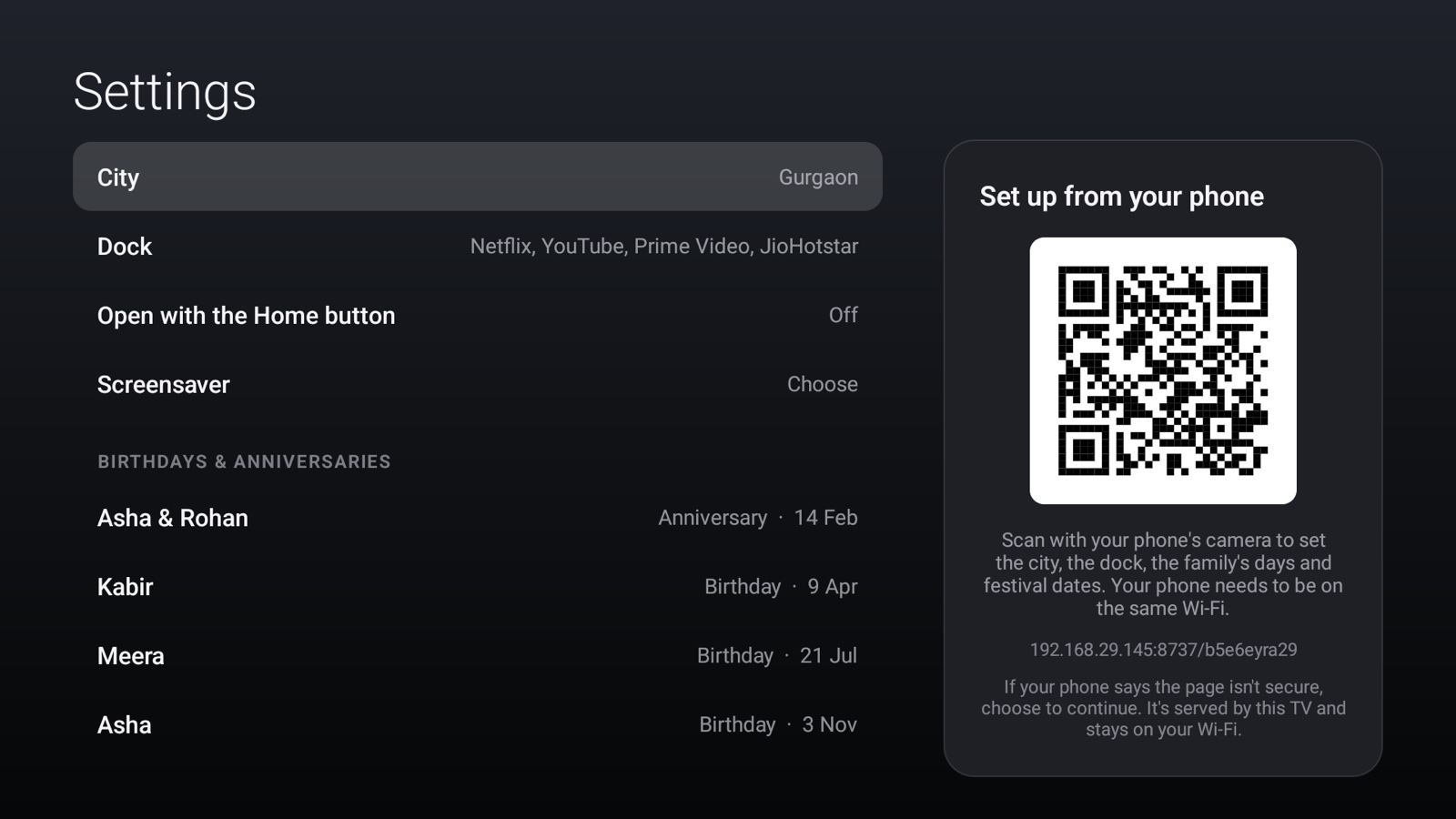
Open the Settings tile at the end of your apps.
| Setting | What it does |
|---|---|
| City | Choose from large cities, or type a few letters and pick from what appears. Changing it fetches fresh weather straight away. |
| Dock | The four apps in the dock. Choose a place to change its app or empty it, or Reset to popular apps. |
| Open with the Home button | Shows whether Aangan opens with Home, and takes you to Android's setting to change it. |
| Screensaver | Opens Android's screensaver settings, where you can choose Aangan's clock. Shown only on TVs that let you choose a screensaver; recent Google TVs offer only their own Ambient mode. |
| Birthdays & anniversaries | Each day, then Add one. Press OK on a day to see its scene, edit or remove it. |
| Aangan closed unexpectedly | Appears only after a crash. Aangan kept a short note on the TV and sent nothing; scan the code to read it on your phone and, if you like, report it on GitHub, or delete it. |
| Festivals | The coming year's festivals; press OK to see, move, hide or restore one. |
From your phone
While Settings is open, the panel on the right shows a QR code. Scan it with your phone's camera, on the same Wi-Fi, and your phone's browser opens a page where you can do everything Settings does, with a proper keyboard.
- The page is served by the TV itself. It runs only while Settings is open, its address carries a fresh secret each time, and it never leaves your home network.
- Some browsers warn that the page "isn't secure", because it uses plain HTTP. That's unavoidable for a page on a home network; see the FAQ.
- City search suggests places as you type, and the dock is four simple choices.
- Changes appear on the TV as you make them.
The screensaver
Aangan's screensaver is a dim clock with the date and the weather, drifting slowly across the screen so nothing burns in. On a festival or family day it carries the greeting too. Choose it in Settings → Screensaver, or in your TV's own screensaver settings, where it's called Aangan clock. Recent Google TV devices don't let you choose a screensaver other than Google's Ambient mode, so there it isn't available.
The Home button
With Open with Home switched on, pressing Home from anywhere brings up Aangan, and so does turning the TV on. If the TV's own home screen appears at start-up, Aangan replaces it. To stop this, switch Aangan off in your TV's accessibility settings, or uninstall Aangan.
Remote reference
| Press | Where | What happens |
|---|---|---|
| OK | An app | Opens it |
| Hold OK | An app | Put in the dock, change, move, hide, or App info |
| Hold OK | Settings tile | Show hidden apps |
| ▲ then OK | Home screen | The Today card |
| Back | Today card, Settings | Closes it |
| Home | Anywhere | Aangan, once Open with Home is on |